Showing posts with label AsyncTask. Show all posts

Friday, 10 November 2017

AsyncTasks done right

As an Android developer you’ve probably already used AsyncTasks to perform long-running tasks in a separate thread and deliver the results back to the main Activity.
AsyncTask are particularly well suited for Activities, because they have coordinated callback methods that run:

  • in a separate thread (doInBackground), to perform long-running operations;
  • in the main thread (onPostExecute, onProgressUpdate, etc.) to display the results in the UI.
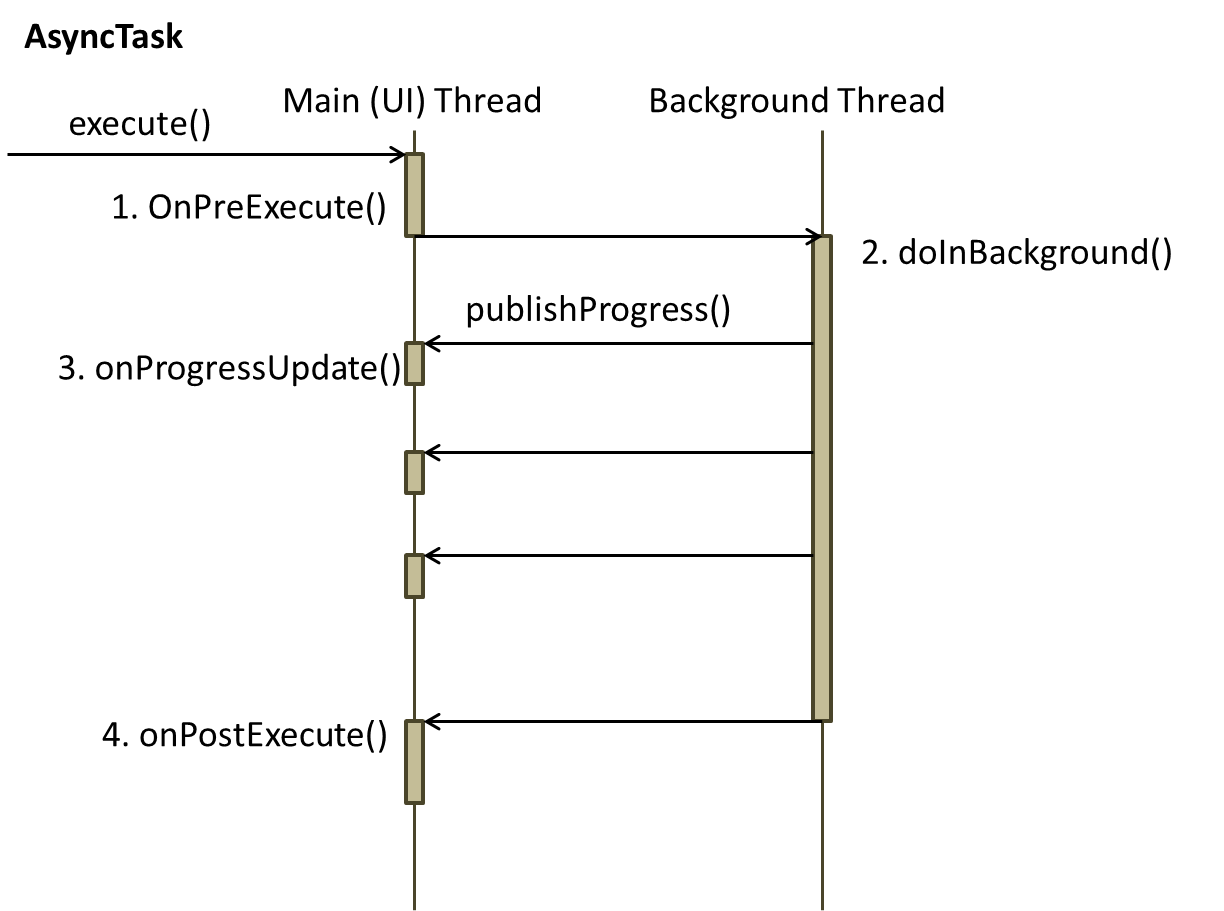
To be more precise, AsyncTasks are generally used for tasks that don’t last too much and are related to the content of an Activity (for example, saving the data provided by the user in a local database).

For long-running operations it is always better to use a Service, because the lifecycle of a Service is not so much affected by the lifecycle of the Activity (what happens if the user closes the app while a background thread is ongoing?).
Anyway, you’ve probably used AsyncTasks in a way like this:
public class MyActivity extends AppCompatActivity {
    
    // ...
    new MyAsincTask().execute(...);
    
    private class MyAsincTask extends AsyncTask {
        @Override
        protected Integer doInBackground(Integer... integers) {
            // long running task
        }

        @Override
        protected void onPostExecute(Integer integer) {
            // display results in MyActivity
        }
    }
}

Within Android Studio Lint gives you a warning, saying that non-static inner and anonymous classes could cause memory leaks.
What’s the problem exactly? Well, in Java non-static inner and anonymous classes hold an implicit reference to the outer class. In our example, the AsyncTask holds an implicit reference to the containing Activity. If we launch an AsyncTask to do some work in the background and, while the operation is ongoing, the user closes the app, the AsyncTask keeps an implicit reference to the Activity: this reference can’t be garbage collected, thus creating a memory leak.

To solve this problem we have to convert our AsyncTask in a static class. Static classes in Java are top-level classes and they don’t hold any implicit reference to the containing Activity.
This technique, however, raises another problem. When the AsyncTask has completed the background task and the method onPostExecute is invoked, the results must be delivered back to the Activity and displayed to the user: our AsyncTask needs a reference to the Activity (maybe we need a Context to start another Activity, or some widgets to display the results). If we use a regular (strong) reference, memory leaks may occur. Moreover, what happes if the Activity no longer exists because the user has closed the app?

The solution is using weak references. JVM ignores weak references. That means objects which have only week references are eligible for garbage collection. They are likely to be garbage collected when JVM runs the garbage collector thread. JVM doesn’t show any regard for weak references.
Using weak references doesn’t prevent the garbage collector from deleting unnecessary objects in memory. In the method onPostExecute, by invoking get() on the weak references, we check if the objects are still in memory or have already been garbage collected. Only in the first case we can display the results to the connected Activity.
Have a look at the following example (the parts of interest are highlighted):
public static class GetScheduledRecordingsTask extends AsyncTask> {
        @Inject
        DBHelper dbHelper;

        private final WeakReference weakFragment;
        private final WeakReference weakCalendarView;
        private final WeakReference weakCompactCalendarViewListener;

        private final Date selectedDate;

        public GetScheduledRecordingsTask(ScheduledRecordingsFragment scheduledRecordingsFragment, CompactCalendarView compactCalendarView, CompactCalendarView.CompactCalendarViewListener compactCalendarViewListener, Date selectedDate) {
            App.getComponent().inject(this);
            weakFragment = new WeakReference<>(scheduledRecordingsFragment);
            weakCalendarView = new WeakReference<>(compactCalendarView);
            weakCompactCalendarViewListener = new WeakReference<>(compactCalendarViewListener);
            this.selectedDate = selectedDate;
        }

        protected List doInBackground(Void... params) {
            return dbHelper.getAllScheduledRecordings();
        }

        protected void onPostExecute(List scheduledRecordings) {
            ScheduledRecordingsFragment scheduledRecordingsFragment = weakFragment.get();
            CompactCalendarView calendarView = weakCalendarView.get();
            CompactCalendarView.CompactCalendarViewListener compactCalendarViewListener = weakCompactCalendarViewListener.get();
            if (scheduledRecordingsFragment == null || calendarView == null || compactCalendarViewListener == null)
                return;

            calendarView.removeAllEvents();
            for (ScheduledRecordingItem item : scheduledRecordings) {
                Event event = new Event(ContextCompat.getColor(scheduledRecordingsFragment.getActivity(), R.color.accent), item.getStart(), item);
                calendarView.addEvent(event, false);
            }
            calendarView.invalidate(); // refresh the calendar view
            compactCalendarViewListener.onDayClick(selectedDate); // click to show current day
        }
    }

// ...

new GetScheduledRecordingsTask(scheduledRecordingsFragment, calendarView, compactCalendarViewListener, selectedDate).execute();

Monday, 5 October 2015

Managing AsyncTasks on configuration changes

The problem

Suppose you have an AsyncTask performing some task in the background (downloading data from a web service, updating an online database, etc.). If the user rotates the device, as you probably know, the current Activity is destroyed and recreated (the callback methods onDestroy and onCreate are invoked).

As a result, when the AsyncTask finishes its task and should deliver its results, the original Activity may no longer exist or it could have been replaced by a brand new Activity. However the AsyncTask is tied to the original Activity and its onPostExecute method won’t work with the newly created Activity. The newly created Activity may even start another AsyncTask (like in our example, see below), thus wasting system resources.

That’s why, as a general rule, you should always perform network operations in a Service: the Service’s lifecycle isn’t directly tied to the Activity lifecycle; a Service is not destroyed and recreated on configuration changes, like AsyncTasks do.
However AsyncTasks are generally easier and quicker to program than Services, so let’s examine some possibile solutions to our “configuration changes problem” using AsyncTasks.

Code

You can download the code for this tutorial from the Android – The Techinal Blog Githubrepository.

The easy solution

A very easy solution to our problem is preventing the Activity from being destroyed and recreated on configuration changes. For example, if you use the same layout for portrait and landscape orientation there is no need to destroy and recreate the Activity when the user rotates the device.

To achieve this, just insert the following line in the AndroidManifest.xml file under the Activity tag:
android:configChanges="orientation|screenSize|keyboardHidden”
This way, when the user rotates the device, the Activity is not destroyed and recreated anymore; conversely the method onConfigurationChanged gets called and you can override it if you need it.

The correct solution

The correct solution to the “configuration change problem” is using a so called “retained Fragment”.
A Fragment represents a behavior or a portion of the user interface within an Activity. Fragment’s life cycle is generally coordinated with the lifecycle of its containing Activity: when the Activity is destroyed on configuration changes all the contained Fragments get destroyed too.

However if you call setRetainInstance(true) within the Fragment class the destroy-and-recreated cycle of the Fragment is bypassed. As a result you can use a “retained Fragment” to hold active objects, like the AsyncTasks, Sockets, etc.


Let’s start with the retained Fragment:
/**
 * This Fragment performs a specific background task and is not
 * destroyed on configuration changes.
 */
public class RetainedFragment extends Fragment {
    /**
     * Interface used by the retained Fragment to communicate with
     * the Activity.
     */
    interface RetainedFragmentCallbacks {
        void onPreExecute();

        void onProgressUpdate(int progress);

        void onCancelled();

        void onPostExecute();
    }

    private RetainedFragmentCallbacks retainedFragmentCallbacks;
    private MyAsyncTask myAsyncTask;

    /**
     * Hold a reference to the parent Activity so we can report the
     * task's current progress and results (the Activity must implement
     * the RetainedFragmentCallbacks interface to receive the data sent
     * by this Fragment).
     * On configuration changes the Android framework passes to this
     * method a reference to the newly created Activity. This way
     * the AsyncTask can deliver its results to the new Activity.
     */
    @Override
    public void onAttach(Activity activity) {
        super.onAttach(activity);
        retainedFragmentCallbacks = (RetainedFragmentCallbacks) activity;
    }

    /**
     * This method gets invoked when the Fragment is created for
     * first time.
     */
    @Override
    public void onCreate(Bundle savedInstanceState) {
        super.onCreate(savedInstanceState);

        // This Fragment won’t be destroyed on configuration changes.
        setRetainInstance(true);

        // Create and execute the background task.
        myAsyncTask = new MyAsyncTask();
        myAsyncTask.execute();
    }

    /**
     * Set the callback to null so we don't accidentally leak the
     * Activity instance.
     */
    @Override
    public void onDetach() {
        super.onDetach();
        retainedFragmentCallbacks = null;
    }

    /**
     * This AsyncTask performs a long task in the background
     * (we fake it with a sleep) and communicates progress and
     * results to the containing Activity.
     * In each method we check that retainedFragmentCallbacks is
     * not null because the Activity may have been destroyed on
     * configuration changes or because the user exits the Activity
     * pressing the back button.
     */
    private class MyAsyncTask extends AsyncTask {

        @Override
        protected void onPreExecute() {
            if (retainedFragmentCallbacks != null) {
                retainedFragmentCallbacks.onPreExecute();
            }
        }

        /**
         * Note that we do NOT call the callback object's methods
         * directly from the background thread, as this could result
         * in a race condition.
         */
        @Override
        protected Void doInBackground(Void... ignore) {
            for (int i = 0; !isCancelled() && i < 10; i++) {
                SystemClock.sleep(1000);
                publishProgress(i);
            }
            return null;
        }

        @Override
        protected void onProgressUpdate(Integer... progress) {
            if (retainedFragmentCallbacks != null) {
                retainedFragmentCallbacks.onProgressUpdate(progress[0]);
            }
        }

        @Override
        protected void onCancelled() {
            if (retainedFragmentCallbacks != null) {
                retainedFragmentCallbacks.onCancelled();
            }
        }

        @Override
        protected void onPostExecute(Void ignore) {
            if (retainedFragmentCallbacks != null) {
                retainedFragmentCallbacks.onPostExecute();
            }
        }
    }
}

And now the code of the main Activity:
/**
 * This Activity creates a RetainedFragment to perform a background
 * task, and receives progress updates and results from the
 * Fragment when they occur.
 */
public class MainActivity extends AppCompatActivity implements RetainedFragment. RetainedFragmentCallbacks {

    private static final String TAG_RETAINED_FRAGMENT = "RETAINED FRAGMENT";
    private RetainedFragment retainedFragment;
    private TextView textView;

    @Override
    protected void onCreate(Bundle savedInstanceState) {
        super.onCreate(savedInstanceState);
        setContentView(R.layout.activity_main);

        textView = (TextView) findViewById(R.id.textView);

        FragmentManager fm = getFragmentManager();
        retainedFragment = (RetainedFragment) fm.findFragmentByTag(TAG_RETAINED_FRAGMENT);

        // If the Fragment is not null, then it is currently being
        // retained across a configuration change.
        if (retainedFragment == null) {
            retainedFragment = new RetainedFragment();
            fm.beginTransaction().add(retainedFragment, TAG_RETAINED_FRAGMENT).commit();
            Log.d(TAG_RETAINED_FRAGMENT, "Retained Fragment created anew");
        }
        else {
            Log.d(TAG_RETAINED_FRAGMENT, "Retained Fragment retained on configuration change");
        }
    }

    // The four methods below are called by the RetainedFragment when new
    // progress updates or results are available. The MainActivity
    // should respond by updating its UI to indicate the change.

    @Override
    public void onPreExecute() {
        Log.d(TAG_RETAINED_FRAGMENT, "onPreExecute() received...");
        textView.setText("onPreExecute() received...");
    }

    @Override
    public void onProgressUpdate(int progress) {
        Log.d(TAG_RETAINED_FRAGMENT, "onProgressUpdate received with progress: " + progress);
        textView.setText("onProgressUpdate received with progress: " + progress);
    }

    @Override
    public void onCancelled() {
        Log.d(TAG_RETAINED_FRAGMENT, "onCancelled() received...");
        textView.setText("onCancelled() received...");
    }

    @Override
    public void onPostExecute() {
        Log.d(TAG_RETAINED_FRAGMENT, "onPostExecute() received...");
        textView.setText("onPostExecute() received...");
    }


}

The code is quite self-explanatory.

When the Activity is created for the first time the method findFragmentByTag returns null, since no Fragment has already been created. As a result a new instance of the RetainedFragment class is created and attached to the main Activity. The main Activity implements RetainedFragment.RetainedFragmentCallbacks interface and is registered to receive updates from the Fragment in the method onAttach.

When the Fragment is created setRetainInstance(true) ensures that it won’t be destroyed on configuration changes. In addition to that the Fragment creates and starts an AsyncTask, defined and managed inside the Fragment class, to perform a long lasting task in the background (for example downloading data from a web service).
Progress updates and final results are delivered to the main Activity through the RetainedFragment.RetainedFragmentCallbacks interface, which is implemented in the Activity (see the logs).

Now let’s suppose that the user rotates the device. This is what happens:

  • the RetainedFragment is not destroyed (because we have called setRetainInstance(true) when the Fragment was created) and the AsyncTask continues to work in the background;
  • the main Activity is destroyed and recreated as usual. When it’s destroyed it’s also detached from the RetainedFragment and the retainedFragmentCallbacks variable inside the Fragment class is set to null as a result. When the Activity is recreated it’s re-attached to the existing Fragment and the retainedFragmentCallbacks variable inside the Fragment is now set to point to the newly created Activity: results and progress updates are therefore delivered to this new Activity, and not to the old one (which doesn’t exist anymore). Notice that the RetainedFragment itself is not recreated because the method findFragmentByTag in onCreate now returns the existing Fragment.